THE COMPLETE APP GUIDE

How SportsPal works. Every detail, for your next plan.

From your first sign-in to your next club tournament. Get to know the details that make finding your people—and getting out together—feel simple.

Explore the guide
Download on the App StoreGet it on Google Play
  • iPhone & Android
  • 50+ activities
  • 20 language options
  • Free to use
People hiking together with a SportsPal banner
SportsPal · Together, beyond the screen.

How SportsPal works

Sign in with Apple, Google or email, create your profile, then discover activities using GPS or a chosen location. Join a session, talk in its chat and meet the group. Or make your own plan, bring a club together and take a saved route offline.

Guide reviewed: · 66 questions answered · 11 chapters

01 / 11

Start with you

Sign in, make your profile, find your people.

What is SportsPal and how does it work?

SportsPal is a mobile app for finding people to do sports and outdoor activities together. Create your profile, discover activities near your GPS or chosen location, join an open session or request approval, and coordinate in the activity chat. You can also host, build a club, connect with SportsPals and organize club tournaments.

Can I sign in with Apple, Google or email and password?

Yes. SportsPal supports Sign in with Apple on supported Apple devices, Google sign-in, and traditional email and password registration and login. Email registration includes email verification. Use the password-reset option if you forget your email account password.

What do I choose when creating my profile?

Choose an available username, add a profile picture and a bio, and select your favourite activities. Your username helps people find and recognize you; your bio and favourites help them understand what you enjoy. Complete the age and policy confirmations during onboarding. SportsPal is for adults aged 18 and over.

Is SportsPal free, and which devices can I use?

SportsPal is free to download and use on iPhone and Android. Get it from the App Store or Google Play. The app helps people coordinate; check with the host about any separate venue, equipment or participation costs before attending.

Where do I find each part of the app?

The main tabs are Home, Clubs, Create, Inbox and Profile. Home is your Discover screen; its map button opens geographic discovery and its SportsPals button opens the social feed. Clubs includes access to tournaments. Profile leads to your calendar, goals, connections and Settings & More.

02 / 11

Find your next plan

Discover, location, filters and the map.

SportsPal app screen: Find your next plan
Discover, location, filters and the map.

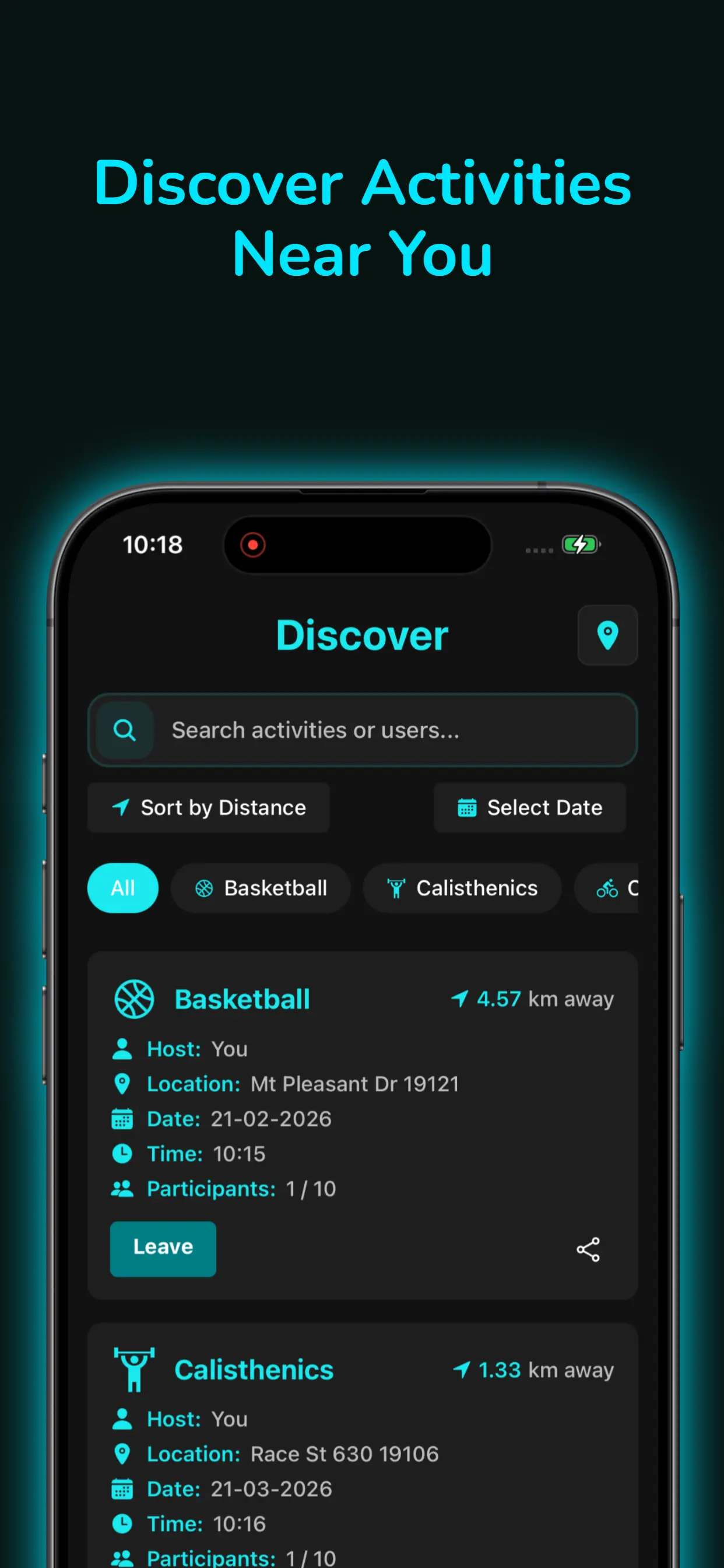
How does Discover work with GPS?

Allow location access so SportsPal can use your current position to find nearby activities and display how far away they are. Your discovery range controls the surrounding area. GPS access helps with nearby discovery; it does not broadcast a live location dot to other participants.

Can I find activities without enabling GPS?

Yes. Open Profile → Settings & More → Discovery → Reference Point. Search for a city or address, choose the correct result, and save it as your area. When GPS is unavailable, SportsPal uses this reference point for nearby discovery. If GPS is active, the saved reference point is a fallback.

How do I change the search distance?

In Settings & More → Discovery Range, choose a radius from 5 to 150 km, displayed in your selected distance units. Increase it to explore farther away or reduce it to keep plans local. The distance shown on an activity is proximity to the discovery position, not the length of its route or a road travel-time estimate.

Which filters and sorting options does Discover have?

Choose an activity type, search by activity, host or location text, select a date, or sort by distance. Your favourite activities are placed first in the activity selector. A specific-date filter shows scheduled activities on that date; clear it to include flexible-date plans. Scroll to see more results and pull down to refresh.

How do I use the Discover map?

Tap the map button on Home, move to the area you want and use Search this area to load activities there. Zoom in if the app asks you to narrow the area. Tap a marker to preview activities at that location, then open details. The map has activity and date filters and a Joined Activities control to include or hide activities you have already joined.

Why might Discover show no activities?

Nearby results depend on what people have created, your search radius and your current filters. Clear the date or activity filter, widen your range, check your GPS or reference point, or search another map area. You can create the first activity in your area. Club activities are found inside their club rather than in the regular Discover feed.

Which sports and activities can I find?

SportsPal supports more than 50 activity types, from football, basketball, tennis, padel and volleyball to running, trail running, cycling, hiking, walking, yoga, gym and swimming. There are also activities such as chess, dance and dog walks. Search the activity selector for the full selection; local availability depends on hosts.

03 / 11

Know before you join

The plan, the people and your place in the group.

What can I see on the Activity Details screen?

Open an activity to see its sport, host, meeting location, date and time or flexible-date status, description, participant count and capacity, and participant profiles. When available, you can inspect its route, distance, elevation and difficulty, see the forecast, get directions, share the activity and access its chat after joining.

Are activities open or private? How does approval work?

Regular activities offer Open joining or Approval required. Open activities let you join directly when there is room. With approval required, send a request; the host or co-host reviews it in Notifications. You can withdraw a pending request. Approval controls participation and chat access; it does not mean the listing is hidden from Discover.

Does SportsPal support flexible dates?

Yes. A host can publish an activity without fixing its date and time. People join first; when the group reaches its target size, the host can coordinate with everyone and confirm a future date and time. Participants are notified when it is scheduled. Discuss availability in chat; a flexible date is not an automatic date vote.

What happens when an activity is full or I receive an invitation?

The participant limit controls available places. A full activity cannot accept another participant until space is available or the host increases capacity. An invitation may allow direct joining or invite you to request approval; read its action before accepting. An invitation does not always bypass the activity’s joining policy.

Can I check weather and directions to the meeting point?

Activity details provide directions to the meeting location through supported map apps and weather information when a forecast is available. A flexible-date activity needs a confirmed date and time before a forecast for that session can be shown. Directions to the meeting point are separate from following an attached GPX route.

Can I leave an activity or rate the experience afterward?

Use Leave on an activity you have joined if your plans change, and tell the group first when possible. Rejoining depends on available places and the joining policy. After an activity ends, SportsPal can prompt participants to rate the experience. Ratings help provide feedback about activities.

04 / 11

Make the plan

Create, edit and manage an activity.

SportsPal app screen: Make the plan
Create, edit and manage an activity.

How do I create an activity?

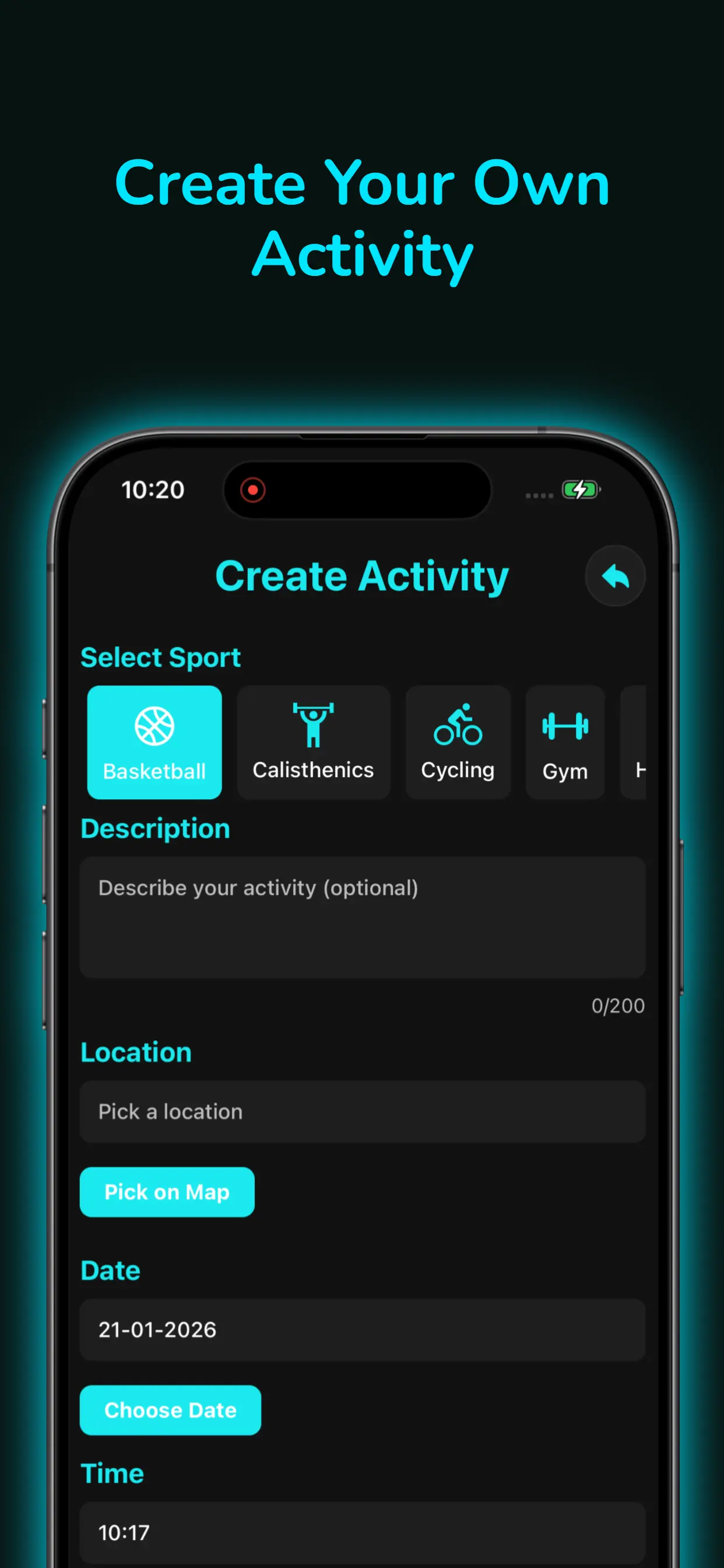
Open Create, choose the activity, pick a meeting point on the map and add an optional description. Choose a fixed date and time or a flexible date, set the participant limit, and select Open or Approval required joining. Add a route when relevant, review the details and host checklist, then publish.

What are SportsPal Picks when choosing a place?

For supported activities and locations, SportsPal Picks suggests venues such as courts and fields near your search area. Tap a suggestion to inspect available venue details and select the meeting point, or choose your own place on the map. A suggestion does not reserve a venue; arrange any booking separately.

Can I reuse a previous activity or route?

Yes. Recreate a past activity to reuse its setup rather than entering everything again, then review the new schedule and details before publishing. Route History lets you reuse a previous route. Always check that the meeting point and route still suit the new session.

How do I edit an activity I host?

Open Activity Details → Manage Activity → Edit Activity. Update the meeting place, schedule, description and participant limit, then save. You cannot change the sport after publishing, and capacity cannot be reduced below the number already joined. Management actions depend on your host or co-host role.

Can someone help me manage participants?

The host can assign one joined participant as co-host. The co-host can help edit the activity, review join requests and manage regular participants. In Manage Activity, the host can change the co-host, remove participants or transfer the host role to the current co-host. Removed participants lose activity and group-chat access.

Can the host leave or cancel an activity?

An activity cannot be left without a host. Assign a co-host and transfer the role before leaving, or cancel the activity. Cancel Activity notifies participants and permanently removes the activity and its group chat; review the confirmation carefully.

05 / 11

Take the route with you

GPX, route planning and offline GPS guidance.

How do I add a GPX route or draw my own?

For route-based activities, use the optional route section while creating the activity. Upload a GPX file, draw a route on the map, or select one from Route History. Route information can include distance, ascent and descent, and difficulty. GPX data can supply route statistics; inspect them before publishing.

Can I see the route before participating?

When an activity has an attached route, open its details to inspect the route preview and available distance and elevation information. Compare the route with the description and ask the host about terrain, pace, equipment and suitability. An attached route is optional, so some activities only have a meeting point.

Can I download the GPX for an activity I am joining?

Yes, when the activity has route data. Use the route download options in Activity Details and choose GPX export to save or share the file with a compatible app or device. A route drawn in SportsPal can also be exported as GPX track points. Check the receiving app or device for its import support.

How do I save a route for offline use inside SportsPal?

While you still have internet, open the activity’s route download options and choose saving inside SportsPal. Wait for the save to finish. Find the saved route in Profile → Settings & More → Saved Routes and open it before leaving to check that it is available. GPX export and saving an offline route inside SportsPal are separate options.

What exactly does the offline route viewer show?

The saved viewer displays the route line, meeting point and available route details without internet. With location permission and a GPS signal, it can show your position relative to the route, distance from it, covered and remaining distance, and progress. It uses the saved route geometry rather than downloaded street-map tiles. It is not spoken turn-by-turn navigation.

Does the whole app work offline, and how do I delete saved routes?

Saved Routes is the dedicated offline feature; discovery, joining, current weather and new messages need connectivity. Saved route details reflect the saved pack, so check updates online before setting out. Saved Routes lets you remove packs from your device. Keep sufficient battery and a suitable backup for outdoor navigation.

06 / 11

Give your crew a home

Find, join, create and manage a club.

SportsPal app screen: Give your crew a home
Find, join, create and manage a club.

How does the Clubs screen work?

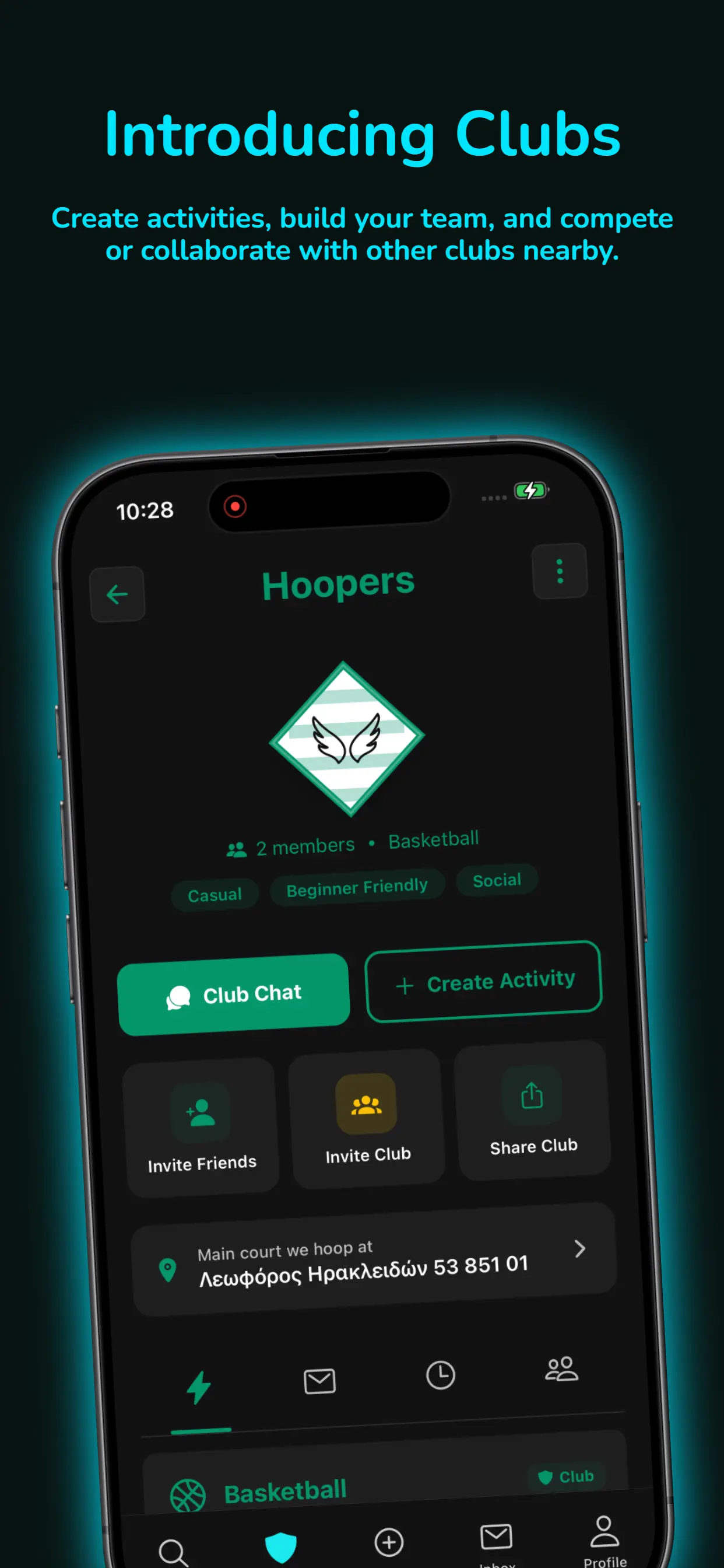
Open Clubs to see your clubs and discover others. Search by club name, filter by activity, and choose open or private clubs. Nearby discovery uses your discovery location and range; name search helps you look for a particular club. Tap a club to open its details. The header also provides Create Club and Tournaments.

What can I see on a club’s details screen?

Club Details brings together its name, custom badge, activities, description, home base and members. Its tabs organize activities, invitations, history and members. Depending on membership and ownership, you can join or request to join, open club chat, see club activities, invite connections, share the club or use management options.

What is the difference between an open and a private club?

An open club lets people join directly. A private club requires a membership request reviewed by its owner. Pending requests can be withdrawn; accepted membership unlocks member access. Private describes the joining requirement, so do not assume every item on the club’s public-facing page is hidden.

How do I create a club and design its badge?

Use Create Club in Clubs. Choose a name and activities, add a bio, select a club vibe and optionally set a home base, then choose open or private membership. Customize the badge using its shape, colours, pattern, outline and sport or mascot icon. Review the preview before launching your club.

How do I edit my club?

As the owner, open Club Details → Club Options → Edit Club. The editor provides controls for the club name, activities, badge, location and privacy. Save each change through the corresponding editor. Owner options also include invitations and deletion; ordinary members have their own membership actions instead.

How do club activities differ from regular activities?

Club activities are organized from inside a club and appear on its activity tab. Open one to see its meeting point, schedule, participants and available route information, join or leave, get directions, access its activity chat or add it to a device calendar once scheduled. Joining requires the relevant club membership. Club activities do not appear in the regular Discover feed.

Can clubs invite or challenge other clubs?

Yes. Eligible club management options let you select a club activity and invite another club to train together or compete. Choose the target club and the appropriate invitation or challenge. Incoming club invitations are organized in the Invitations tab, where authorized club users can review the available response.

Can I invite friends, leave a club or delete one I own?

Club Options includes inviting connections and sharing a club link. Members can use Leave Club to end their membership. Owners have a separate Delete Club action with confirmation because it permanently removes the club. Check the available action for your role rather than treating leaving and deleting as the same thing.

07 / 11

Bring clubs into competition

Create, register, draw and follow a tournament.

Where can I find tournaments?

Open the Tournaments button in the Clubs header. Browse nearby tournaments or search by name to look beyond your local area. Open a tournament to inspect its sport, organizer, location, schedule or flexible date, registration status, club capacity and roster requirements.

How do I create a tournament?

Use the create button on Tournaments. Enter a name, sport, description and meeting location; choose the competition format, club capacity and fixed or flexible roster size. Set the schedule or use a flexible date, review the setup and publish. After creation, welcome clubs and generate the draw or fixtures when ready.

Which tournament formats does SportsPal support?

Choose knockout competition or a round-robin league. Knockout supports a fixed bracket or a fresh draw round by round. A league gives clubs fixtures and standings based on results. The organizer controls the draw and competition management; registration locks when matchups are generated.

How do I register my club for a tournament?

Open Tournament Details and choose Register. Select an eligible club you are authorized to represent, choose its participating members, and confirm a roster that meets the tournament’s size rules. Registration is for a club and its roster, rather than a standalone individual entry. Availability depends on open registration, capacity and eligibility.

What can I do in Tournament Details after registration?

Follow registered clubs and their rosters, tournament status, the bracket or fixtures, results and standings where relevant, and the tournament conversation. Authorized organizers can generate draws or fixtures and record results. Check the available controls before changing or withdrawing a registration; options depend on your role and the competition stage.

Can a tournament have a flexible date too?

Yes. A tournament can gather club registrations before its exact date and time are fixed. The organizer sets the target number of clubs needed before scheduling, then confirms a future date and time when ready. Registered participants receive the scheduling update.

08 / 11

Stay connected between sessions

SportsPals, posts and other people’s profiles.

What is SportsPals and where do I open it?

Tap SportsPals at the top of Home. It is the social hub for posts and connection activity, separate from nearby activity discovery. Browse updates, search for participants, open profiles and create a post. Building connections gives your feed more people and shared activity to follow.

How do I find someone and become SportsPals?

Use participant search in SportsPals or tap someone’s avatar in an activity, club or conversation. Open their profile and send a connection request. They can accept or decline from Notifications; pending requests can be cancelled. Your profile keeps your connections together so you can find people again.

Can I share photos, write posts, like and comment?

Yes. Create text or photo posts in SportsPals, open posts to read the conversation, like posts, add comments and reply to comments. Posts and activity updates help people keep in touch between real-world sessions. Use the available report options for content that breaks community rules.

What can I see and do on another participant’s profile?

A participant’s profile can show their picture, username, bio, favourite activities, club badges, social links and activity information. You can request a connection, message when their settings allow it, or use block and report options. Upcoming and past activity visibility follows that person’s privacy settings, so different viewers may see different information.

09 / 11

Keep the conversation together

Chats, requests, invitations and notifications.

SportsPal app screen: Keep the conversation together
Chats, requests, invitations and notifications.

What is inside Inbox?

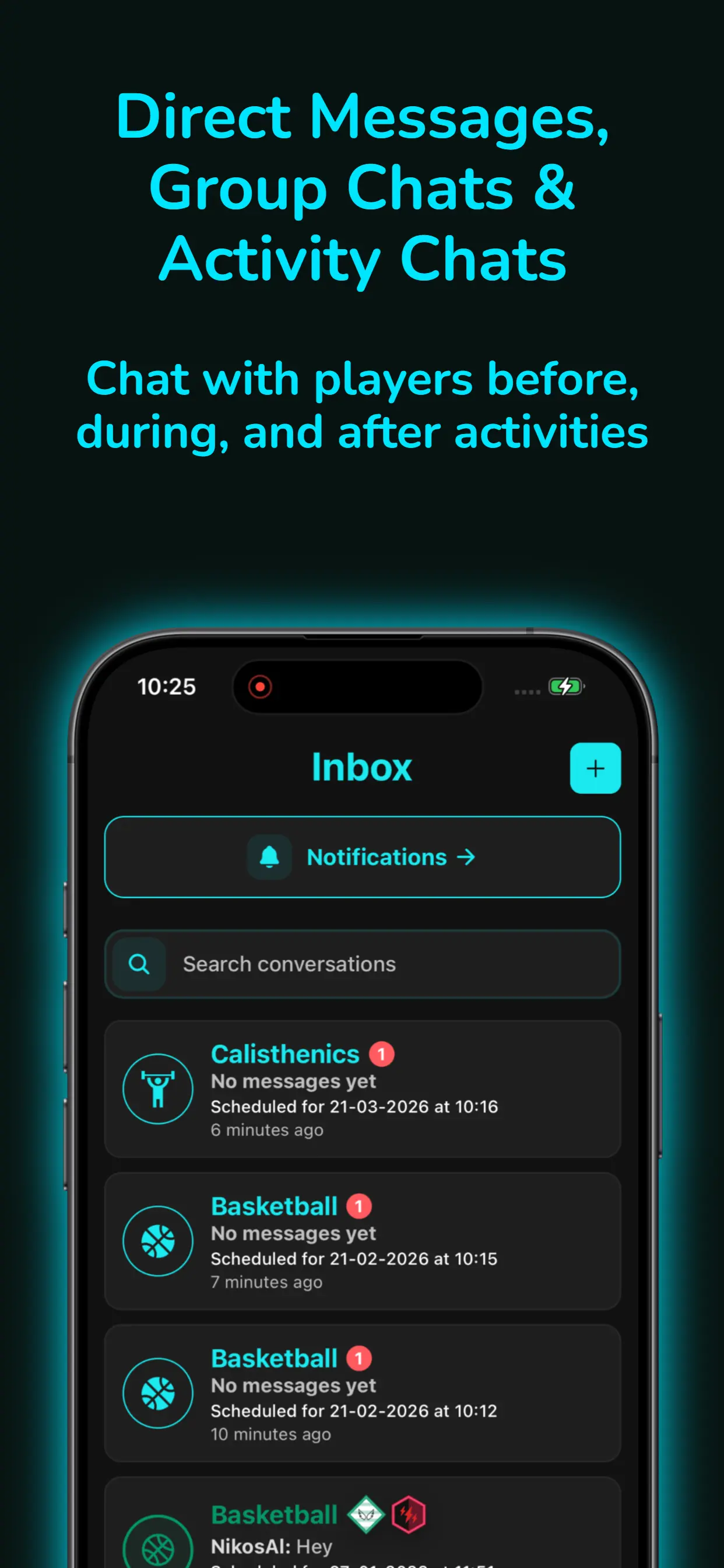
Inbox groups your chats and notifications. Chats include direct messages, custom groups, activity groups, club conversations and club-activity conversations. Notifications collect connection requests, invitations, join approvals and relevant activity updates, so you can review and respond in the app.

When do I get access to an activity or club chat?

Joining an open activity, or being approved for one, gives you access to its participant chat. Club chat follows club membership, and club activities have their own conversation. Use chat to agree on pace, equipment and timing without exchanging phone numbers. Leaving or removal can end your access.

Can I send direct messages and create my own group chat?

Open a participant’s profile or an existing conversation to message them, subject to messaging privacy and blocking rules. Create a custom group from Inbox, choose connections, and add a group name and optional photo. Custom groups are separate from automatically managed activity and club chats.

Can I mute, hide, leave or report a chat?

Open the chat options for the actions available to that conversation, such as mute or unmute, hide or delete, view the related activity or club, and report. Custom groups can be left; leaving a club chat requires leaving the club from Club Details. Push notifications can be managed in Settings and device permissions.

10 / 11

Your activity, in one place

Your profile, calendar, goals and SportsPal Pass.

What is on my own Profile screen?

Profile is your personal hub: your identity, favourite activities, connections, club badges, activity history and progress. Use it to reach upcoming and past activities, your calendar and goals, edit your profile, share your profile link and open Settings & More. Your own management controls differ from the actions visitors see on your profile.

Can I change my username, bio, picture and favourite activities?

Yes. Open Edit Profile from your profile or Settings & More. Update your username, photo, bio and favourite activities, and optionally add supported social profile links. Usernames must be available. Save your changes; favourite activities also help organize activity selectors around what you enjoy.

Can I control who messages me or sees my activity history?

In Edit Profile → Privacy & Messaging, choose the available audience for messages, upcoming activities and past activities: connections or everyone. These settings control profile and messaging visibility. Public activity listings remain visible in Discover even when you restrict activity visibility on your profile.

How does the in-app calendar work?

Open Calendar from Profile to browse your scheduled activities by day and open their details. The activity list separates upcoming and past plans. Flexible-date plans need a confirmed date before they can appear on a specific day. Calendar helps you keep track of participation; it is separate from exporting an event to your device calendar.

Can I add an activity to Apple Calendar or another device calendar?

Use Add to Calendar on a joined, scheduled activity, allow calendar access and select a writable device calendar. The app creates an event with activity details and reminders. An approval request must be accepted first, and a flexible-date activity must be scheduled first. Check exported events after plan changes.

What are Goals and levels?

Goals turns participation into visible progress across four levels: Getting Started, Building Momentum, Community Leader and SportsPal Legend. Tasks include creating or joining activities, completing sessions with others, connecting with SportsPals, posting, chatting and rating. Complete the current level’s goals to unlock the next one.

What is the SportsPal Pass for Apple Wallet and Google Wallet?

Your SportsPal Pass is a shareable profile identity with a QR code linked to your profile. Open the pass option in Settings & More to add or update it in Apple Wallet on supported iPhones or Google Wallet on supported Android devices. It helps people find your profile; it is not a tournament admission ticket or payment card.

11 / 11

Make it feel like yours

Languages, units, dates, permissions and support.

Which languages does SportsPal support?

SportsPal currently offers 20 app language options: English, Greek, French, German, Italian, Dutch, Serbian, Turkish, Spanish, Polish, Brazilian Portuguese, European Portuguese, Romanian, Russian, Ukrainian, Czech, Danish, Croatian, Hungarian and Swedish. In Settings & More → Language, choose a language or follow your device. User-written posts and messages are not automatically translated by this setting.

Can I use kilometres, miles, metres and feet?

Yes. In Settings & More → Regional formats, choose device defaults, kilometres or miles for distance and speed. Distance displays use metres or feet for suitable short distances and kilometres or miles for longer distances. The preference changes presentation; it does not change the real meeting point, route or search area.

Which date formats can I choose?

Regional formats lets you follow the device or select Day / Month / Year, Month / Day / Year, or Year / Month / Day. For example, 23 November 2026 can be shown as 23/11/2026, 11/23/2026 or 2026-11-23 in numeric date displays. This changes date presentation, not the scheduled moment.

Can I change the theme and control app permissions?

Choose Light or Dark in Settings & More → Theme. App Permissions helps you reach device controls for location, camera and notifications. Photos need the relevant camera or library permission; calendar export needs calendar permission; live route guidance needs location access. Push alerts can also be switched in notification settings.

How do blocking, reporting and real-world safety work?

Use profile, chat, post or activity options to report inappropriate behaviour or content, and block people when needed. Manage blocked users in Settings. Read the activity description, ask about suitability and choose clear public meeting points. SportsPal helps with coordination; a profile, route or listing does not guarantee someone’s identity, expertise or a safe environment.

Where can I get help, manage sign-in or delete my account?

Settings & More includes linked sign-in accounts, support contact, the app guide, the Sporty introduction, app information, legal policies and account deletion. Use Linked Accounts to inspect or manage available sign-in methods. For help, contact sportspalapplication@gmail.com. Read the deletion confirmation before submitting because it starts removing your account data.

Labels can vary with your app language and version. Actions depend on your role, membership and the state of the activity.

SPORTSPAL

Your next good plan
starts with people.

Find an activity. Say hello. Or create the plan someone else has been waiting for.

Download on the App StoreGet it on Google Play